Running Unity games via Steam in Linux
There seems to be a lot of confusion about how to run games built on the Unity engine distributed by Steam on a Linux system. I recently solved this problem after backing the promising survival sandbox game Planet Nomads on Kickstarter. Here is how to configure an Ubuntu Linux system and launch Planet Nomads successfully.
Prerequisites
If you have an Nvidia card, you must download and install the official proprietary drivers provided by Nvidia. I could not get Unity to launch with the open-source drivers. Once I installed the proprietary (closed source) drivers, I was able to launch Planet Nomads from the Steam application.
Configure CentOS/RedHat VMs with Kickstart files on Virtualbox
Kickstart is a type of file that’s used to automatically install RedHat or CentOS Linux on a physical or virtual server. If you are managing more than a few servers, it’s a good idea to configure the servers via kickstart files instead of logging in and configuring each one manually. However, some unfortunate choices were made when defining the Kickstart file format, and it’s not the easiest thing to use. When creating a new Kickstart or making major changes, it’s good to have way to quickly iterate and test your changes. Iterating on a Kickstart file is slow and inconvenient in an enterprise environment in which a freshly booted server obtains an image and Kickstarter file via PXEboot. To speed up Kickstart testing and debugging, I’ve developed a simple way to use Kickstart files with CentOS/RedHat guest virtual machines that run in VirtualBox on my Mac. This process should also work with Windows or Linux hosts. When the RedHat installer is booting, it looks for a file called ks.cfg on a volume with label OEMDRV. First, we will create this volume as a small virtual disk image. On a Mac, you can create this image with Disk Utility as shown below. Note that the Name needs to be OEMDRV (though you can make the filename anything you want). Create OEMDRV disk image OSX Disk Utility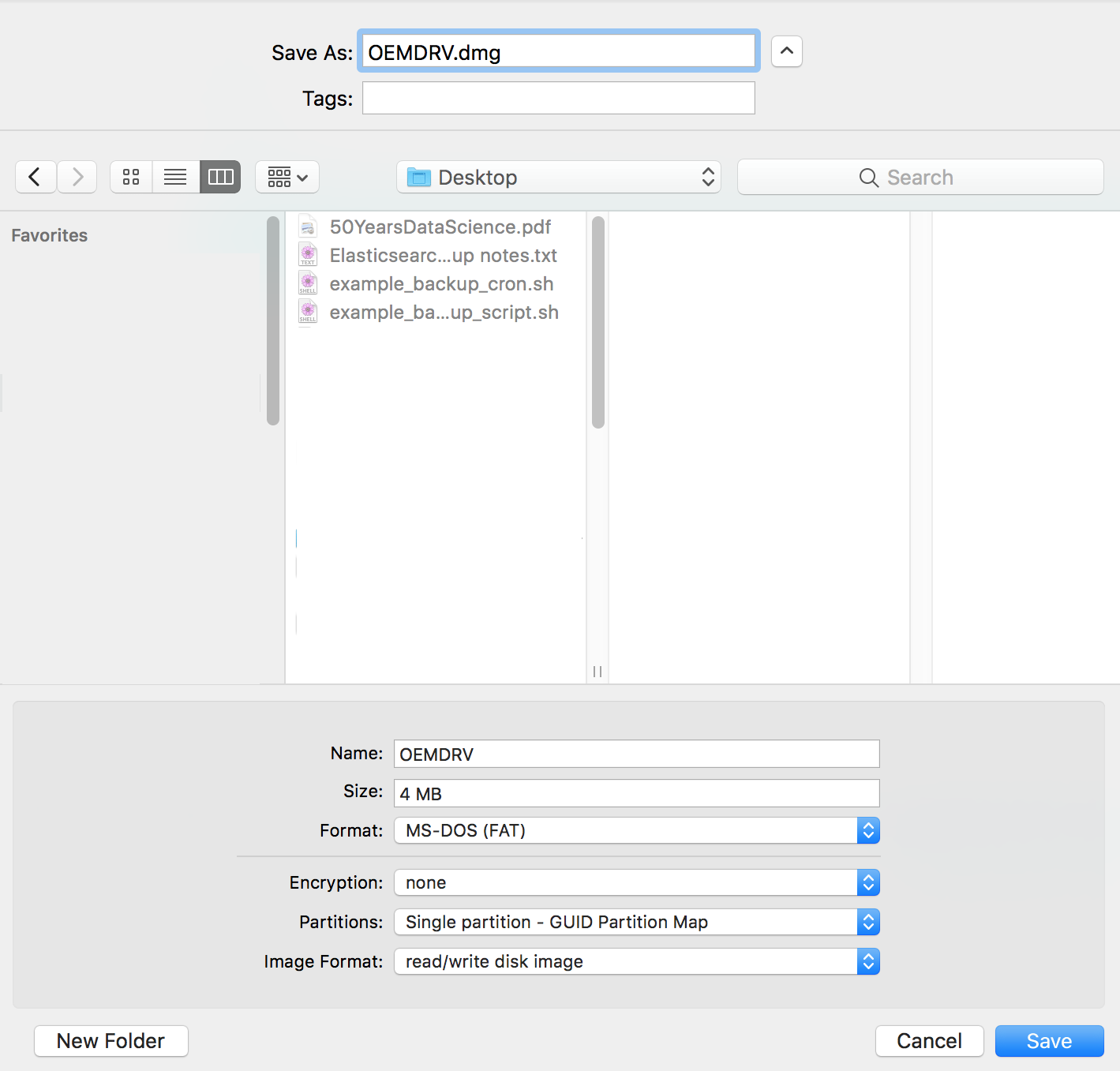
General error: 2006 MySQL server has gone away
“MySQL Server has gone away” is a cryptic error that can be hard to troubleshoot (look at all the various responses on Stack Overflow!) Many problems can cause this error; I would like to document one specific case. In this example, the client is a PHP app using the Phalcon framework:
[Mon, 09 Apr 18 03:34:08 -0400][ERROR]  SQLSTATE[HY000]: General error: 2006 MySQL server has gone away
exception 'PDOException' with message 'SQLSTATE[HY000]: General error: 2006 MySQL server has gone away' in /path/to/ModelBase.php:
Stack trace:
#0 [internal function]: PDOStatement->execute()
...
#17 {main}
This error can be tricky to troubleshoot. I looked in three logs:
Warning: CentOS/RedHat 7.4 installs FreeRADIUS 3 with breaking changes
When you run yum upgrade on a CentOS/RedHat 7 instance, you will be upgraded to 7.4. If you have a FreeRADIUS server, you will be upgraded from version 2 to 3, and your server will likely stop authenticating! Good times! Fortunately, the solution was not complicated for us, because we had good documentation.
Symptoms
Your radius server suddenly starts denying logins.
Diagnosis
The configuration file /etc/raddb/radiusd.conf has changed enough between versions 2 and 3 that you cannot re-use the old version. To get radius debugging output, stop the radiusd service, and run (as root):
Managing persistent disks on Google Compute Engine
It can confusing when you have multiple persistent disks on an instance running on Google Compute Engine. For example, a server may have separate disks for the filesystem root, MySQL data, logs, and /tmp. Once you’ve created the Compute Engine disks and attached each one to the instance, how do you know which Compute Engine disk maps to each volume on the instance? First, describe the instance to see a list of the attached disks:
MySQL/MariaDB, logrotate, and SELinux
Assumption: You have SELinux Enforcing on your database server. If you’re still solving problems by permanently setting SELinux to Permissive, I don’t think you can really call yourself an IT professional. Here are the commands to set the SELinux context of all text MySQL log files to var_log_t so that they can be rotated by logrotate:
semanage fcontext -a -t var_log_t "/var/lib/mysql(/.*.log(-[0-9]+(.gz)*)*)+"
restorecon -R -v -F /var/lib/mysql
NOTE: This expression will also match the file /var/lib/mysql/tc.log and change its context, which will prevent MySQL from starting. If your version of MySQL uses tc.log, here is one possibility:
Synology DiskStation DS1515+ Review
Summary: The Synology DS 1515+ is a capable little NAS with a large feature set, but it has some software reliability issues and limited technical support.
Hardware
The DS1515+ is a compact unit that feels sturdy. It holds five 2.5" or 3.5" drives, and 3.5" drives can be installed without any tools. You will need a Phillips-head screwdriver to install an additional RAM module, but that’s also a very simple process. The fans are also easily replaceable.
anacron run-parts generates invalid or malformed syslog messages
On RedHat and CentOS 6 and 7, anacron generates syslog messages that are mangled when they are forwarded by rsyslog. I found the cause and a solution in a comment by Tomas Heinrich on this old Fedora bug. Sadly, that bug was closed instead of getting fixed, probably because Fedora is oriented toward desktop users who are not generally forwarding syslog messages! Syslog uses the following default template for messages: "%TIMESTAMP% %HOSTNAME% %syslogtag:1:32%%msg:::sp-if-no-1st-sp%%msg%" The syslogtag field is truncated to 32 characters, but cronie-anacron includes a lot of data in its tag. The tag gets truncated to 32 characters, resulting in invalid syslog. If you try to send them to Logstash, you’ll get errors like this: {"message":"Nov 4 19:01:01 my-web-03 run-parts(/etc/cron.hourly)[1858 starting 0anacron","@version":"1","@timestamp":"2016-11-05T00:01:01.146Z","port":55456,"type":"syslog","tags":["_grokparsefailure"],"host_ip":"192.168.17.23"} Unfortunately, the problem is with the sending host, not Logstash, so you have to update the rsyslog config on every host that generates anacron messages. I prefer to do this in /etc/rsyslog.d to keep the configs more manageable. Add these two lines, which add a template that has no restriction on the length of the tag field, and activate the template when forwarding: $Template fwd,"%TIMESTAMP% %HOSTNAME% %syslogtag%%msg:::sp-if-no-1st-sp%%msg%" $ActionForwardDefaultTemplate fwd I placed these lines in /etc/rsyslog.d/logstash.conf along with my other Logstash-specific rsyslog configs.
Making Windows work for Linux and OS X admins
If you are a Linux or OS X power user, then you’re used to having all the necessary tools built into your OS. When you log into a Windows system (What! No command line?) you may feel lost. These tools and shortcuts will help you be productive on Windows systems.
Windows Shortcuts
- Alt-x is a magic shortcut key on Windows 8 and Server 2012. It pops up a little menu in the lower right corner of the screen which contains just the items that an admin needs. Try it!
Windows Programs
If you want Windows to work a little bit like Linux or OS X, you need to install a few of these free programs. Some are gratis, and some are libre.