Updating to Wordpress 5 on a Linux Host: Requesting FTP Credentials
Wordpress 5 didn’t install automatically on sites hosted on my CentOS 7 Wordpress hosting server. That’s by design, because I’m selfish and I’d rather wait for a few bug-fix releases before making a major upgrade. When I chose to upgrade manually on a test site, Wordpress asked for my FTP credentials:
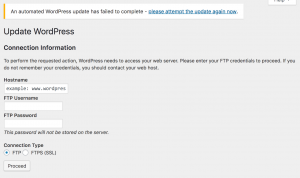
Connection Information: FTP credentials
If you’re hosting Wordpress on your own server, it does not need FTP credentials. This page is a symptom of a permissions issue with the underlying server. The web server (typically Apache) is unable to write the updated files to the Wordpress directory. From a security standpoint, this is actually a good thing. You generally don’t want to allow a public-facing service to make changes on your server. This problem occurs in other situations, such as configuring the WordFence plugin, so I’ve written a page devoted to troubleshooting Wordpress permissions on Linux hosts. That page describes how to fix the permissions issue without compromising the general security of your Wordpress host.
New Relic APM on Fedora/CentOS/RedHat with SELinux Enforcing: Solved
I found the solution for getting the New Relic APM Agent to run on a CentOS 7 system with SELinux Enforcing. The only SELinux modification you have to make is to change the context of the log file directory /var/log/newrelic. You can temporarily make these changes with the chcon command: [code lang=“bash”] chcon -R -t httpd_log_t /var/log/newrelic/ [/code] Kill any running instances of newrelic-daemon. If you’re using New Relic’s recommended default setup, make sure that the file /etc/newrelic/newrelic.cfg does not exist. Verify that all required values in /etc/php.d/newrelic.ini are correct (especially the license key and the application name). Finally, restart httpd: [code lang=“bash”] systemctl restart httpd [/code] If that works, you should see output in both /var/log/newrelic/newrelic-daemon.log and /var/log/newrelic/php_agent.log. Now, make this file context change persistent, and verify the result: [code lang=“bash”] semanage fcontext –add –type httpd_log_t “/var/log/newrelic(/.*)?” restorecon -RF /var/log/newrelic/ ls -laZ /var/log/newrelic/ [/code] When you restart Apache, it spawns the newrelic-daemon processes, which communicate with APM via the socket file /tmp/.newrelic.sock. You really don’t want to run the newrelic-daemon processes via systemd if you can avoid it. The resulting process tree should look like this: