Posts
Disk space utilization monitoring in Google StackDriver
Setting up disk space utilization alerts in Google Stackdriver is almost unbelievably tricky. It’s easy to think that you can just choose the metric “Disk Utilization” and add a condition to alert when disk utilization crosses some threshold for some length of time (such as over 55% for 1 hour).
File System Type Filter
Your first problem is that a Linux system has many types of file systems, even if it only has one disk. You probably want to alert when your root disk is running out of space; therefore, you need to filter out non-disk filesystems like procfs or tmpfs. Add a device filter to select exactly which devices you want to alert on; in my case, with only one disk per server, I match only on device rootfs.
Managing remote servers with salt-ssh
I love using Salt to configure and manage servers at scale. Typically, a Salt master server manages an army of servers which are on the same private network. A salt-minion daemon runs on each client server and communicates with the master. Sometimes you need to manage a server which is outside of your internal network, such as a marketing web server running on a service like AWS LightSail, Linode, or Digital Ocean. That’s when salt-ssh comes in handy.
Find Last Login Time for Wordpress Users in the SQL Database
Question: What are the timestamps for the last login for every Wordpress user in this Wordpress site?
Most answers say to install some plugin, and there are dozens that will show the date and time when each Wordpress user last logged in. However, plugins are a problem, because they always need to be kept up to date, and many plugins get abandoned. Now, you have a potential security problem. Also, this approach assumes that your Wordpress front-end is up and running; if your site has been hacked or accidentally broken, you need to go into the database to do some forensics.
MySQL replication fails with WSREP error after restart
Scenario
A single Percona MySQL 5.7 server replicates asynchronously with a cluster of Percona MySQL 5.7 servers. After rebooting the single server, replication failed with the following symptoms:
mysql> show slave status \G**************************** 1. row ************** Slave_IO_State: Waiting to reconnect after a failed registration on master Master_Host: my-replication-partner Master_User: repl Master_Port: 3306 Connect_Retry: 60 Master_Log_File: mysql-bin.000120 Read_Master_Log_Pos: 3848512 Relay_Log_File: my-host-hame-relay-bin.000012 Relay_Log_Pos: 4 Relay_Master_Log_File: mysql-bin.000120 Slave_IO_Running: Connecting Slave_SQL_Running: YesI checked my MySQL text log (/var/log/mysql.log in my case, but the path may vary, or messages may go to syslog) and found the following error:
Updating to Wordpress 5 on a Linux Host: Requesting FTP Credentials
Wordpress 5 didn’t install automatically on sites hosted on my CentOS 7 Wordpress hosting server. That’s by design, because I’m selfish and I’d rather wait for a few bug-fix releases before making a major upgrade. When I chose to upgrade manually on a test site, Wordpress asked for my FTP credentials:
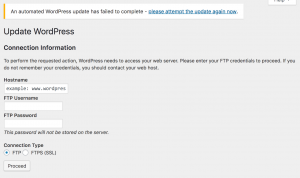
Connection Information: FTP credentials
If you’re hosting Wordpress on your own server, it does not need FTP credentials. This page is a symptom of a permissions issue with the underlying server. The web server (typically Apache) is unable to write the updated files to the Wordpress directory. From a security standpoint, this is actually a good thing. You generally don’t want to allow a public-facing service to make changes on your server. This problem occurs in other situations, such as configuring the WordFence plugin, so I’ve written a page devoted to troubleshooting Wordpress permissions on Linux hosts. That page describes how to fix the permissions issue without compromising the general security of your Wordpress host.
Troubleshooting Wordpress permissions errors on Linux hosts
Wordpress permission errors usually manifest as a request for FTP credentials with the error message, “Connection Information: To perform the requested action, WordPress needs to access your web server. Please enter your FTP credentials to proceed. If you do not remember your credentials, you should contact your web host.” You generally do not need to enter these credentials. If you’re hosting Wordpress on your own Linux server, read on to see what might be causing the problem, and how to fix it.
Netgear GS728TS, GS728TPS, GS752TS, and GS752TPS Switch Configuration Guide
Overview of the Netgear GS Switch Series
Netgear switch models GS728TS, GS728TPS, GS752TS, and GS752TPS (Gigabit Smart Switches) are value-priced edge switches (about $1000 on Amazon for the GS752TPS 48-port model with PoE) with limited Layer 3 routing capabilities. These switches are best deployed as edge switches in a small office environment with a limited budget. The fan noise is annoying but not deafening, so they should be located in a network closet or noise-insulated rack. In the case of budget constraints, the GS7 series could be used as core switches. They can be stacked for high availability, and they support LAGs and bonding to allow equipment with multiple NICs to run one cable to each switch, allowing the equipment to stay up even if one switch unit dies. However, these switches are not really designed for “enterprise” use as core switches.
Creating Kubernetes Secrets Using TLS/SSL as an Example
Creating Kubernetes secrets isn’t intuitive the first time you do it. A common reason to use a secret is to add a SSL/TLS certificate to a cluster. Kubernetes provides two ways to add a secret: directly on the command line, and from a YAML source file. First, let’s generate a test certificate to work with and select our cluster.
Prerequisites
openssl req -x509 -nodes -days 365 -newkey rsa:2048 -keyout tls.key -out tls.crt -subj "/CN=foo.bar.com"This command produces two files: tls.key and tls.cert. In production, you’d generate a key file and use it to obtain a certificate from a certificate authority.
Yum/RPM Package Signing Key Fingerprints
The Importance of Checking Keys
RPM packages are signed using public-key cryptography. A package maintainer uses their private key to sign a package when they create it, and they make the corresponding public key available to the world. When you install a package with Yum or RPM, RPM uses the public key to verify the integrity of the package. If this process weren’t in place, it would be very easy to tamper with packages to install malware. When you install a package and you haven’t used that package’s public key before, yum or RPM prompts you to accept the public key by showing you the public key’s fingerprint. The fingerprint is a short sequence of bytes used to identify a longer public key. You should check the fingerprint presented by rpm or yum against a trusted fingerprint (usually published on the package maintainer’s web site). If you don’t check the fingerprint, you could be importing a public key from a malicious actor, and then yum will happily install whatever malicious payload that actor has inserted into RPM files.